Send Captivate Quiz Data to JavaScript

Adobe Captivate 3 doesn’t have a built-in mechanism for sending quiz results to JavaScript. Here’s a workaround you may find useful.
The plan
The basic premise of this workaround is to hijack Captivate’s ’email report’ functionality, replacing the original email-centered JavaScript with new JavaScript. This approach was also used in an Adobe article named Storing Captivate Test Scores in a Database and Exporting Them To Excel with ColdFusion (link no longer available).
My goals for this project were to:
- Get all available quiz data from Captivate
- Put the data into an easy-to-access JavaScript object
- Remove as much of the original Captivate JavaScript as possible, leaving a cleaner global space
- Use SWFObject (currently SWFObject 2.1) to embed the Captivate SWF
Here’s a working example. There is a link to a ZIP containing the source files (including a template) at the end of this article.
What data can I get from Captivate?
Captivate is a fickle friend, and only gives us a few pieces of data: status, location, raw score, max score, min score, and time.
Here’s a sample of what Captivate sends to JavaScript when using the email reporting option:
Core Data|"Status","Location","Raw Score","Max Score","Min Score","Time"|
"passed","3","30","30","0","00:00:17"||
Interaction Data|"Date","Time","Interaction ID","Objective ID","Interaction Type",
"Correct Response","Student Response","Result","Weight","Latency"
This string contains two primary elements: the Core Data element, and the Interaction Data element. These elements are separated by two vertical bars (||). The Core Data portion of the string is:
"Status",
  "Location",
  "Raw Score",
  "Max Score",
  "Min Score",
  "Time" | "passed",
  "3",
  "30",
  "30",
  "0",
  "00:00:17";
Notice how the Core Data portion contains headers to the left of the vertical bar (|) and data to the right of the bar. Now look at the Interaction Data portion of the string:
"Date",
  "Time",
  "Interaction ID",
  "Objective ID",
  "Interaction Type",
  "Correct Response",
  "Student Response",
  "Result",
  "Weight",
  "Latency";
Notice there is no interaction data, only interaction headers. Although Captivate can track interactions, for some reason the interaction data was not coming across in my tests. The headers were coming across, but the data wasn’t. If any of you figure out why, drop me a line.
For now, we’ll just focus on the Core Data.
Step 1: Create and configure your Captivate file
Create a Captivate quiz containing a few questions (you can also use my example contained in the ‘source files’ ZIP). Make sure all of your questions have the “report answers” option checked.
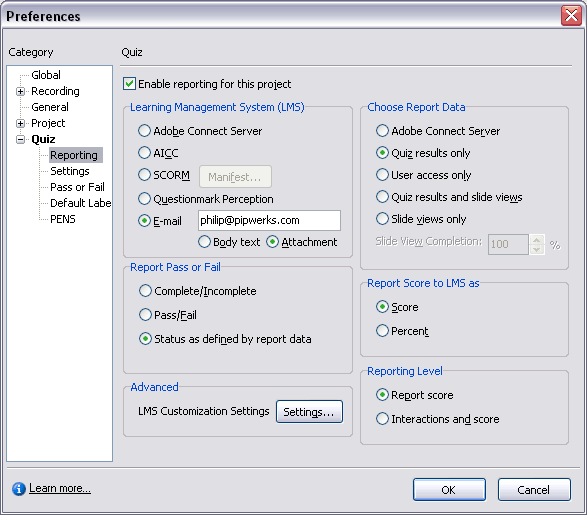
There are a few important settings to change in your quiz preferences. First of all, go to Quiz > Quiz Preferences. Change your Reporting settings to match the screenshot: “Enable reporting” is checked, “E-mail” is checked, an email address is entered (Captivate checks to see if a well-formed email is found when using this option; you could probably use something fake such as 123@abc.com), “Quiz results only” is checked, and “Report score” is checked.
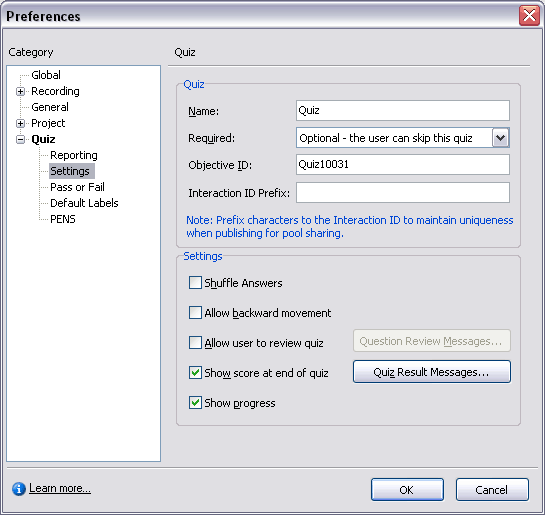
Next go to the Settings preferences. For this example, I unchecked “Allow backward movement” and “Allow user to review quiz.” This is up to you, it doesn’t affect the JavaScript; I just wanted my quiz to be as simple as possible from a UI standpoint.
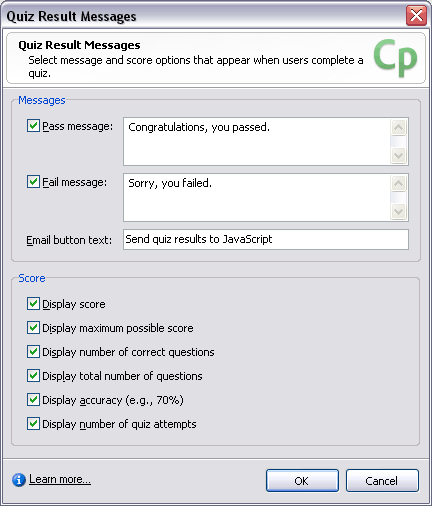
While on the Settings screen, click the Quiz Result Messages button. A popup will appear; change “Email button text” to whatever you like. For this example, I changed it to “Send quiz results to JavaScript.” You might choose to use something such as “Submit quiz results.” It’s important to note that the quiz results are only sent to JavaScript when the user clicks this button, so make sure your instructions are clear.
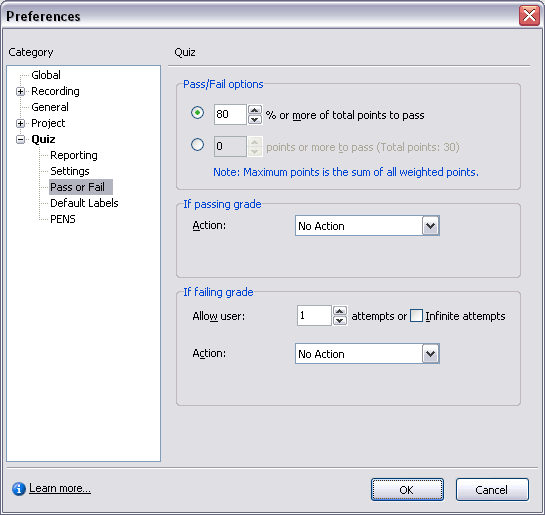
In the Pass or Fail settings, I set the passing and failing actions to “No Action.” Remember, the quiz results are only sent to JavaScript when the user clicks the “Send quiz results to JavaScript” button.
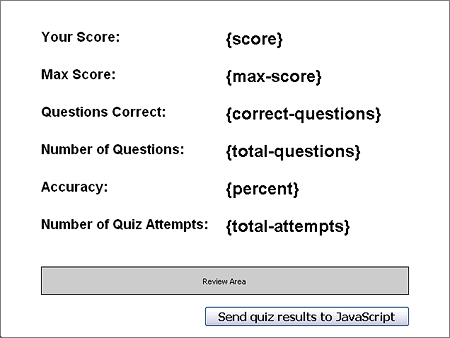
By default, Captivate inserts a “Continue” button on the results page at the end of a quiz. Clicking “Continue” will cause the movie to resume playing (un-pause). Since we don’t want the user to click “Continue” before clicking the “Send quiz results to JavaScript” button, we should get rid of the “Continue” button. However, due to Captivate’s typical quirkiness, it appears you can’t simply delete the “Continue” button. My solution was to make the button transparent with white text, then shrink it as small as possible and stick it off in a corner where no one will click it.
The end result looks like this:
Publish the Captivate file. You can uncheck the “Export HTML” options since we’re going to use our own HTML.
Step 2: Prepare the HTML file
Create a blank HTML page. Give it whatever title you like. Embed your SWF using your embed method of choice; I use SWFObject. My Captivate-generated SWF is named “quiz_report-score-only.swf”. Your HTML code should look something like this:
<html xmlns="http://www.w3.org/1999/xhtml">
  <head>
    <meta http-equiv="Content-Type" content="text/html; charset=utf-8" />
    <title>Captivate score in JavaScript</title>
    <script type="text/javascript" src="swfobject.js"></script>
    <script type="text/javascript">
      //Embed the SWF in the HTML
      swfobject.embedSWF(
        "quiz_report-score-only.swf",
        "capQuiz",
        "640",
        "480",
        "7"
      );
    </script>
  </head>
  <body>
    <h1>Captivate score in JavaScript</h1>
    <div id="capQuiz">
      <p>
        If you're seeing this message, you need to install or update your Flash
        Player
      </p>
    </div>
  </body>
</html>
Your code may look different if you use a different embed method, but the point is to have a clean HTML file with no extraneous JavaScript and no unnecessary markup.
Once you’ve tested your file to make sure the SWF loads and plays correctly, move on to step 3.
Step 3: Add the custom JavaScript
Converter function
I’ve prepared a function (pipwerks.UTILS.convertCaptivateEmailData) that converts Captivate’s ’email’ string to an object. This function has been saved in a compressed (<1kb) external file named pipwerks.UTILS.convertCaptivateEmailData.js. Without getting into the boring details, the function splits the string into arrays then merges the arrays into an object. It contains error-checking, and also does a little housecleaning along the way, such as removing quotes and converting property names to lowercase.
Let’s add a link to pipwerks.UTILS.convertCaptivateEmailData.js in our HTML file so we can take advantage of this function later on:
<head>
  <meta http-equiv="Content-Type" content="text/html; charset=utf-8" />
  <title>Captivate score in JavaScript</title>
  <script
    type="text/javascript"
    src="pipwerks.UTILS.convertCaptivateEmailData.js"
  ></script>
  <script type="text/javascript" src="swfobject.js"></script>
  <script type="text/javascript">
    //Embed the SWF in the HTML
    swfobject.embedSWF(
      "quiz_report-score-only.swf",
      "capQuiz",
      "640",
      "480",
      "7"
    );
  </script>
</head>
Replacements for Captivate’s email functions
Next, we’ll replace the ‘report via email’ JavaScript functions invoked by the Captivate SWF. We’ll place these functions in the <head>, just before the SWFObject embed.
<head>
  <meta http-equiv="Content-Type" content="text/html; charset=utf-8" />
  <title>Captivate score in JavaScript</title>
  <script
    type="text/javascript"
    src="pipwerks.UTILS.convertCaptivateEmailData.js"
  ></script>
  <script type="text/javascript" src="swfobject.js"></script>
  <script type="text/javascript">
    function appendEmailBody() {} //nothing to see here, move along!
    function sendMail() {} //nothing to see here, move along!

    function padMail(strAddress, strSubject, strBody) {
      //The important stuff will go here
    }

    //Embed the SWF in the HTML
    swfobject.embedSWF(
      "quiz_report-score-only.swf",
      "capQuiz",
      "640",
      "480",
      "7"
    );
  </script>
</head>
As you can see, there are three Captivate-generated JavaScript functions; while we don’t need the first two functions (appendEmailBody and sendMail), they’re included here to ensure the Captivate SWF doesn’t throw any errors by invoking a function that doesn’t exist.
The star of the show is the padMail function. It accepts three parameters, of which we only need the third parameter: strBody. This string was meant to be inserted into the body of the email message, and contains all the important quiz information.
To get the data into a useable JavaScript object, just pass the strBody parameter along to our helper function pipwerks.UTILS.convertCaptivateEmailData; the function will return an object you can use in your course.
function padMail(strAddress, strSubject, strBody) {
  //Forward parameter strBody to our custom function.
  var quiz = pipwerks.UTILS.convertCaptivateEmailData(strBody);

  //Do something with 'quiz' object
  alert("score: " + quiz.rawscore);
}
The quiz object
While I’m using the name ‘quiz’ for this example, you can name the object whatever you prefer; I’m just calling it ‘quiz’ for demonstration purposes.
Object properties
The object contains all of the reporting values that were sent from Captivate. pipwerks.UTILS.convertCaptivateEmailData also creates a new property named accuracy, which is a percentage created using the formula (rawscore/maxscore) * 100. Our final list of properties is:
- status
- location
- rawscore
- maxscore
- minscore
- time
- accuracy
Remember, these are all of the properties sent by Captivate and were not chosen by me! I didn’t leave anything out; reportable data such as ‘number of attempts’ are not sent over, and I have no idea why.
Accessing the data
Now that we’ve converted the Captivate email string to an object, you can simply access the properties by using the dot syntax. For example, if your object name is captivatedata, you’d access the data like so:
var captivatedata = pipwerks.UTILS.convertCaptivateEmailData(strBody);
alert("score: " + captivatedata.rawscore);
And that’s all there is to it! Here’s another look at the final product.
Comments
William Peterson wrote on September 7, 2008 at 8:41 pm:
Thanks very much! This tweak seems wonderful and easy to do with JavaScript. Some of us don't have Adobe Connect Server or Questionmark Perception to handle test scores. And if we just need a simple report like the one in email, other than complete results management in a server, this tip with JavaScript would be definitely what we need. I suggest that Captivate may offer the simple quiz report feature as samples like wondershare quizcreator does, which includes free ASP/PHP samples within application help to enable users to build Web database to receive a simple test report (link no longer available). And more than JavaScript, PHP/ASP might be used more popular, as avoiding some unknown issues for JS/browser, I think. William Peterson
Philip Hutchison wrote on September 7, 2008 at 11:08 pm:
@William Thanks… I think. Your post is bordering on spammy, but I'll let it slide. 🙂
Dave wrote on October 2, 2008 at 7:18 pm:
Thanks for this excellent blog post. Only thing is, I cannot get your demo to work. The Flash quiz works fine, but the "Send Quiz results to javascript" button does not seem to do anything at all. Would you have any idea why? I've used IE6 and Firefox, and both do the same thing. Could it be a security thing?
Philip Hutchison wrote on October 2, 2008 at 7:51 pm:
@dave yup… if you're testing locally (not on a server), you'll need to adjust your flash player security settings to allow files on your hard drive to run scripts/communicate.
Bill Kirke wrote on October 21, 2008 at 2:05 pm:
I have hundreds of users taking a quiz that we've created, and for most of them the email reporting that we've built works fine. However for a small handful (less than a dozen), padMail() is never called. sendMail() is being called, but not padMail(). The machines that don't work are very consistent. We've tried upgrading the flash player, but that didn't help. Any ideas why this would be, and how we can get those machines to report their quiz results?
Philip Hutchison wrote on October 24, 2008 at 9:00 am:
@Bill That's an interesting issue; I haven't encountered it myself. Maybe it's a configuration issue?
Neil wrote on October 25, 2008 at 1:42 pm:
Thanks for this, I can comfortably get the captivate data into javascript objects. I am having issues sending those objects to an ASP page to insert them into access. Any help would be greatly appreciated. There is an an article on Adobe's site but that only works with Captivate version 2.
Philip Hutchison wrote on October 25, 2008 at 1:48 pm:
@Neil Once the data is in JavaScript, you'd need to submit it as a form to your ASP page. One popular approach is xmlhttprequest (ajax). There are a ton of resources for that online, just google it. 🙂
Philip Hutchison wrote on October 29, 2008 at 12:23 pm:
I recently received this message in an email: Thanks for this post. About your issue with interaction headers coming through only with no data…uh, forgive me if I'm stating the obvious..but you have to choose "Interactions and score" in the Reporting options for it to transmit that data. From your screenshot, it doesn't seem that you're checking that. As I wrote in the top of the entry, I tried publishing with the "Interactions and score" option checked, and it didn't work. The headers were coming across, but the data wasn't. If any of you figure out why, drop me a line. For now, we'll just focus on the Core Data. Thus, the screenshots I took use the simplified approach which reports only the score. But thanks for the heads-up. 😉
Frank McLean wrote on January 16, 2009 at 11:19 pm:
Hi Philip, It's been my recent experience with IE that it's not possible to consistently say which of either padMail() or sendMail() (and sometimes both) is called – luckily, I've not encountered the 'neither' case as yet. This seems to be 'random', in that I certainly can't spot a pattern – certain machines seem to be disposed to 90% of the time use padMail(), some are biased the same towards sendMail(), etc, unlike one of the previous commentators, where it was consistently one or the other. My 'solution' has been to push the same code into both methods and bracket it with: if (!alreadyRun) { alreadyRun = true; … more code… } This works for me. In fact, it's the only thing I've found that does. I use javascript on an absolute 'have to' basis, so I'm sure there's a more elegant solution. Hope this helps someone and I thank you for your journal, which IS tremendously helpful. Thanks, Frank
Philip Hutchison wrote on January 16, 2009 at 11:27 pm:
@Frank Thanks for the kind words. I haven't run into the padMail/sendMail issue myself, but it seems to be a common issue. Your approach sounds like a good idea. If I have time I'll test it out. Until then, anyone reading this blog and encountering the aforementioned problem might want to try modifying the pipwerks.UTILS.convertCaptivateEmailData function to try Frank's suggestion.
Andrew Cording wrote on February 2, 2009 at 6:10 pm:
Hi Philip, Like Neil's posting on 25th of October 2008, I am struggling to send those javascript objects to an ASP page and insert them into MS access. I can understand that javascript is client-side and that these need to be passed to a form on an asp page where that can then be picked up and inserted into MS Access (which could be done via xmlhttprequest (ajax)- as per your response to Neil. However after Googling (and wasting 4 days) I still could not find anything about xmlhttprequest which specifically describes how to do this. Any further help (such as a string of code showing how this would be done)would be greatly appreciated.
Andrew Cording wrote on February 2, 2009 at 8:29 pm:
Hi Philip (again), My other consideration is how to best attach the users name and/or email adress to their test results. Once the test results are captured and stored in MS Access there is still obviously a need to put some user ID next to these results. Could a user ID field be completed somehow prior to the "Send quiz results to javascript" button is pressed so that the results along with the user ID is sent to the MS Access database together? PS This a great web site – this is an up an coming area of which information currently very scant.
Philip Hutchison wrote on February 2, 2009 at 8:47 pm:
The best resources for xmlhttprequest, in my opinion, are Jeremy Keith's book [Bulletproof Ajax](http://www.amazon.com/gp/product/0321472667?ie=UTF8&tag=pipwerkscom-20&linkCode=as2&camp=1789&creative=9325&creativeASIN=0321472667) and JavaScript frameworks like MooTools and jQuery. Jeremy's book is a short and very easy read. It will help you understand what xmlhttprequest is and how it works by walking you through the xmlhttprequest code. I really enjoyed it and highly recommend it. If you want a pre-built solution, try using a framework such as MooTools or jQuery. They're designed to eliminate many of the 'gotchas' of cross-browser support so you don't need to be an expert. Both the MooTools and jQuery sites have xmlhttprequest demos.
Philip Hutchison wrote on February 2, 2009 at 8:54 pm:
RE: the name, you can handle that in your HTML. Just have them fill out a form (name, email) before loading the Captivate SWF. If you use JavaScript to embed the SWF (I recommend SWFObject), you can do eveything on one HTML page: Display form to gather info, replace form with SWF after info is gathered, then take JS output from Captivate and send to a database using xmlhttprequest. BTW, I just realized you said you're using MS Access. xmlhttprequest is meant for **online** databases (SQL Server, MySQL, Oracle, etc.), not MS Access. I don't think it will work with a non-web-based database system.
Andrew Cording wrote on February 3, 2009 at 3:06 pm:
Hi Philip, Thanks heaps for your input. I'll investigate Jeremy Keiths book and see how we go. I'm assuming that there must be some way to get these results into access. I'll let you know when I get there.
Andrew D wrote on September 22, 2009 at 2:14 am:
This works brilliant, well done… except for Captivate 4 I've tried everything to get it working with my captivate 4 files and nothing
philip wrote on September 26, 2009 at 1:32 am:
Captivate 4's new 'variables API' feature kind of makes this hack obsolete. Captivate 4 makes quiz data available via its system-defined variables. You should be able to easily retrieve quiz data from Captivate 4 SWFs without using any hacks. The official Adobe Captivate blog has a number of posts that may help you sort it out.
philip wrote on September 26, 2009 at 2:07 am:
FYI I received this via email from "Dirk". Haven't tested it, but thought someone may find it useful:
I have been trying to get this email thing working and stumbled on a
possible solution by accident. I added a window dialog in between the
configs you had for SendMail and Padmail functions as show here…
javascript
function MyResults(message) {
options = "toolbar=0,status=0,menubar=0,scrollbars=0," +
"resizable=0,width=300,height=200";
Im not to sure why it seems to work but it is now opening up Outlook
and sending an email to me with the results of the quiz.
You do get a security dialog warning advising that an application is
trying to send an email but at least it seems to work.
Yuri Peixoto wrote on October 26, 2009 at 12:32 pm:
Hi Phillip! Great site you have right here, eh? Well, I´m fighting with some problems in Captivate, and come here to see if you could give me a light in the dark cave that I enter. Situation: my schooll is developing all the courses to be played locally, without the browser. We´re focusing in Captivate 4, and using a little of Adobe CS3 to photo manipulation, vectors, and animations. The evil among us: We need a rich ambient, concerning the student´s data. We need to store in a local database the lesson that the student finish, the result of the quizz, etc. This could be done even in a floppy disk. The partial solution: Delphi. A Delphi menu that show the menu of the course (example: all the MS Word 12 lessons, and locks the lessons, so that the student only can play the lessons one by one, in sequence). This, is done. This menu load the student data (name, last lesson viewed), and show him the relevant points. The eternal problem: we need that Captivate lesson, in the end, open a Delphi .exe, to store that the student finish that particular lesson. Until now, I don´t have any progress with this. When I execute the command open another file, it start to open the browser and download the .exe first, what is really annoying. I have searched in long sites, looking for a solution. I tried a flash button with the action fscommand (of course, without success). I´m right now without ideas, and with a deadline waiting to bite my head off. 😛 There is any way to resolve this? We´re using the .exe output, but I´m thinking that a .swf output could give me interesting results, too. Thanks in advance
philip wrote on October 26, 2009 at 12:43 pm:
@yuri That's a tough one. I personally never use the .exe format, so I don't really have any advice. Have you tried the Captivate forums? Sending data from Captivate to a database is relatively easy if you embed the Captivate file in a web browser; simply extract the quiz data from Captivate 4 using the new system variables in CP4 (my CaptivateController utility makes this easy), then use standard AJAX (xmlhttprequest) to send the data to your database. Much less complicated than .exe files, and more likely to work across computer systems — Mac, Windows, Firefox, IE, Safari, etc.
Yuri Peixoto wrote on October 26, 2009 at 12:56 pm:
Yes, I have take a cry for help in Adobe Forums, and until now, no one find a solution. We´re using the course outside the web browser to give the student a bigger sense of interactivity (I think that I mispell something right here). We teach software usage here, so in the lessons, we have a lot of software demonstration, so, using it inside the browser is not an option, to my superiors. If you have some idea to help me, I will be very glad. Right now, I started some trainings in Flash and Action Script, to see if I can develop something useful, but the deadlines here will not wait for me to finish my courses. One thing spark my mind, after a day browsing your website. If I use the .swf format, and create a Flash loader, to execute locally in fullscreen mode, probably I could achieve the type of control that I want, right? P.S.: I don´t have any idea in how to develop this, only musing something that cross my mind.
philip wrote on October 26, 2009 at 1:01 pm:
@Yuri Flash's fullscreen mode disables keyboard interaction as a security precaution. It probably won't work in your case. Maybe you can embed the training into a custom Adobe AIR application. I've never done this, but I know it's possible. Unfortunately I have no other advice. Good luck!
Yuri Peixoto wrote on October 26, 2009 at 1:28 pm:
Wow! Good to know about the keyboard issue. It spare me a lot of time trying to do it function, only to lost my work. 😉 Well, now I will go to see if I find a good AIR training. Probably, lynda.com will have something to me. :} Anyway, thanks to put me in the right direction, Phillip. I will study, and when I discover how to put this working, I will probably make a "how to", to help everyone, too. 😀 But now, it´s time to run. P.S.: we have a way to make the Delphi / Captivate problem work, but it´s not exactly a good one: a Delphi application that run together with the lesson, and to store the results in the end; this is not a good solution, but can work until I discover how to resolve this. The problem is, that the Delphi application will continue to run as a Windows process even if the student don´t finish the lesson. Captivate can manipulate an external file, a .txt, by example?
Yuri Peixoto wrote on October 29, 2009 at 12:14 pm:
Hi, Phillip. I think that I have found a solution. Could you take a look at: http://www.connectusers.com/tutorials/2009/03/flash_wrapper/index.php and http://www.connectusers.com/tutorials/2009/03/track_proprietary/ and, see if this can be useful to me? My lack of knowledge in Flash is actually my biggest enemy. I´m trying to learn as fast as possible, but the deadlines are trying to kill me, too. 😉 Thanks in advance.
xpetit wrote on December 1, 2009 at 1:23 pm:
Hi, I use Captivate 4 to create quizzes for virtual campus. I created the file to send the scores to MySQL database and works fine. But my problem is other. Sometimes, when the students click to Finalize button on Score slide (the last slide) for to send the data, doesn't work. Other times works correctly. What's the problem? Flash configuration? Navigator configuration? The quizzes are in the apache server on linux. I'm lost because from my computer always works fine. Thanks in advance!
philip wrote on December 1, 2009 at 2:47 pm:
Honestly, I don't know. It's probably a Captivate quirk. First thing I'd check is the browser/OS/Flash Player combo the learner has… is there a pattern for the people who have problems? Is it always a specific version of Flash Player or a specific browser?
xpetit wrote on December 2, 2009 at 12:26 am:
Hi, When the student logins to the virtual campus, I capture the OS version, navigator version and IP address (and other data). But I don't know how can i detect the flash player version on the student computer from the server. Can I? how? Maybe it's the way to establish a pattern. Thanks in advance!
Marie wrote on January 6, 2010 at 6:00 am:
Has anyone figured out how to get results from Captivate 4 into an Access database with a ASP.NET/SQL combo? Unfortunately my company is a microsoft shop and we don't have an LMS… thanks!
Steve wrote on January 27, 2010 at 9:44 am:
I have Captivate version 3, and I just downloaded a demo of Captivate version 4. I am using a javascript similar to what the blog described…. no matter which version 3 or 4… .padmail is not consistently called in IE. (our company machines are primamrily XP with IE 6) I have chased various “ideas” to fix this problem.. making my JS a separate file… upon publishing choosing flash player 8+ (instead of 7 within cap 3)… and obviously creatign a module in cap 4… same results… inconsistently .padmail is not called… once the computer has experienced this error.. it works every time after that (for that module) a new module the machine may or may not have that error… GRRR!! Does anybody have any ideas?
Jenny wrote on February 19, 2010 at 12:38 am:
Thanks for a brilliant tutorial! Could you help me though? When I click on the send quiz results button it generates a blank page using the browser which says about:blank. Your example does exactly the same. Have I missed something? Regards
Kai wrote on March 18, 2010 at 1:33 am:
Hi there, thanks for the scripting! Unfortunately your converter function inside of the pipwerks.UTILS.convertCaptivateEmailData.js seems not to work for me. The alert window says rawscore is undefined. I had a look indise of the js file and found a missing }. Might that be? I am no js expert at all, but tht's what I noticed. Thanks for your help, Kai
Kai wrote on March 18, 2010 at 2:38 am:
Hi again, sorry for blaiming you, it was my fault 😉 I transferred the percentage score from captivate. The string them looks different and does not contain the maxscore and rwascore part. Cheers and many thanks! Kai
Daniel wrote on May 27, 2010 at 7:03 am:
I have had no luck finding any good documentation about the "CP4 Variables API." >> Captivate 4’s new ‘variables API’ feature kind of makes this hack obsolete. Any suggestions? I'm looking to pass or call CP variables from SWFs being used as web-objects … called from within a SCORM 1.2 wrapper.
philip wrote on May 27, 2010 at 10:11 am:
There's all kinds of information online: Captivate Variables Gone Wild > List of System Variables in Cp4 [Official Adobe documentation for Captivate variables](http://help.adobe.com/en_US/Captivate/4.0/Using/WSCB934979-86BE-40d2-8BB8-A66956575988.html) How to use user-defined variables etc.
Aleks wrote on November 3, 2010 at 2:42 pm:
Thanks for the thorough tutorial. A couple years ago, we used it to create a site with quizzes built in Captivate 4. It worked perfectly. Now, our client would like to start building flash files in Captivate 5. Does this tutorial still apply, or are there any known changes or problems with sending quiz data to javascript in Captivate 5? Thanks in advance, Aleks
philip wrote on November 4, 2010 at 10:44 pm:
@aleks CP5 makes this post moot. CP5 includes a more robust set of system variables that let you grab quiz scores (and other tidbits) without jumping through so many hoops. See my list of CP5 variables (look for the ones with 'quiz' in the name). If you need to query your Captivate file for the value of a system variable, you can use my CaptivateController … it's super easy and free.
Susan Wright wrote on January 20, 2011 at 5:04 pm:
I'm wondering if this method will work for us. Here is the situation. We are building our courses from several CP5 projects then aggregating the swfs with CP5 aggregator. Our database then calls the swf built from the aggregator and this swf pulls the other lessons from the database to load and play. Our current plan is for the quiz results that are reported to the database will be in the last swf presented to that student. Another possible issue is that we have a final slide after the quiz results where we make a summary of what they've seen and has a course completion button that they select to receive credit for the course and are sent to an online survey about the course. So what do you think? I wish you lived in Elkmont Alabama so bI could pick your brain and not type all this one handed.
philip wrote on January 20, 2011 at 7:36 pm:
@susan this method might work for you, but my code in this post doesn't reflect changes made in CP5. it could take some fiddling with. i haven't used this code since 2008, and am not actively maintaining it.
Susan Wright wrote on January 21, 2011 at 9:10 am:
What sort of fiddling? Be gentle I'm not a code monkey… Since we call an aggregator swf would it work just having the html in the folder where the course is? The html with the changed javascript wouldn't have to be the one called to run the course would it? Additionally do you know of a way to make the alternate reporting method work without php and sql? We use an oracle database. Thanks for answering so promtly.
philip wrote on January 21, 2011 at 9:34 am:
@susan unfortunately what you're proposing is not possible without substantial coding. nature of the beast. i haven't used it myself, but CP5 has a new publishing option for exporting data to databases. they made a TV episode, maybe you'd find it useful. http://tv.adobe.com/show/publish-and-track-results/
Susan Wright wrote on January 24, 2011 at 5:43 pm:
I've seen it but it calls for SQL and php which the database folks here are against using.