IFrames and cross-domain security, part 2

Update 10/2010: A new working example with cleaned up code is available.
About six weeks ago, I wrote a post about some issues I was encountering with iframes and cross-domain security. I promised I would write about whatever workaround I decided to use; this post details that workaround. Warning: it feels more complicated than it is, and may take a while to get your head around. Once you get the gist of it, it’s actually a pretty straightforward system.
The problem
Recap of the issue
- I have a JavaScript-powered HTML course interface residing in our learning management system at domain A. For the purposes of this post, let’s call this domain myLMS.com.
- The course interface loads content stored on a website at domain B, which is a completely unrelated website and not a subdomain of domain A. Let’s call this site content.org.
- The interface loads the external content into an iframe; this content includes course activities that must send a completion notice to the interface.
- Since the content is from an external domain, JavaScript communication between the iframe and the parent frame is explicitly forbidden, meaning the content can never send the completion notice to the parent frame.
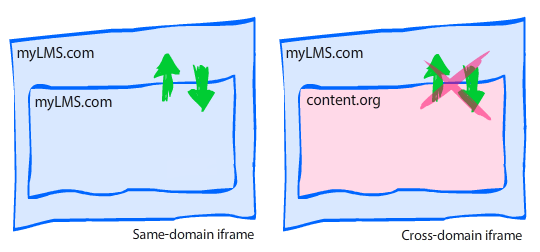
Example scenario
- The interface at myLMS.com loads a JavaScript-powered quiz question from content.org into the iframe.
- The user is not supposed to be allowed to move forward until the question is answered; this means the interface must disallow forward progress until it gets a completion notice (via JavaScript) from the quiz question.
- Since the quiz question is loaded into an iframe and is not from the same domain as the parent frame, it is not allowed to interact with the parent frame and can’t use JavaScript to communicate with the course interface. This means the completion notice can’t be sent to the course interface, and the learner can’t move forward.
The hack
What’s a boy to do? Make a hack, of course. 😉
After searching high and low for answers, I decided to use a nested-iframe hack. From what i can tell, it’s a fairly common workaround. Here’s how it works:
- Parent frame is from domain A.
- Content in child frame (iframe) is from domain B.
- Child frame loads a hidden iframe which is served from domain A. Since this nested iframe is served from domain A, it has unrestricted access to the JavaScript in the parent frame.
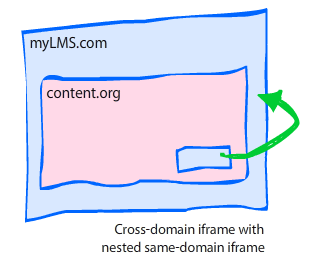
Ok, ok, it’s starting to make your head spin, right? Well, what makes it even more complicated is that the nested frame can’t communicate with the child frame, either! In fact, it all seems like a pointless exercise until you add in one crucial ingredient: a querystring in the nested iframe’s URL.
The querystring
The HTML page loaded into the nested iframe is a dedicated proxy (helper) file; it only contains JavaScript, and includes a JavaScript-based querystring parser that examines the string and executes a function based on the content of the querystring.
Here’s how the final sequence of events would look:
- myLMS.com loads quiz question from content.org into an iframe.
- When quiz question is completed, it uses JavaScript to dynamically create a nested iframe.
- Before loading the nested iframe, a querystring is added to the URL, such as
proxy.html**?result=passed**. - The JavaScript in the proxy HTML examines the querystring and acts accordingly. In this example, it sees that the variable “result” has a value of “passed”, so it sends a completion notice directly to the JavaScript contained in the parent frame.
The scripts
Parent frame (myLMS.com)
For this example, we’re going to assume the parent frame contains a JavaScript function named interactionCompleted.
function interactionCompleted(result){
   //Do something with result
}
Content iframe (content.org)
The content iframe, which is loaded from the external domain content.org, contains a function that creates the nested iframe element, then loads the proxy.html file with the proper querystring. You can invoke the proxy whenever you need it. In this example, it gets invoked via the setCompletion function.
function setCompletion(result){

    //The name of the frame
    var id = "proxyframe";

    //Look for existing frame with name "proxyframe"
    var proxy = frames[id];

    //Set URL and querystring
    var url = "http://myLMS.com/proxy.html?result=" +result;

    //If the proxy iframe has already been created
    if(proxy){

        //Redirect to the new URL
        proxy.location.href = url;

    } else {

        //Create the proxy iframe element.
        var iframe = document.createElement("iframe");
        iframe.id = id;
        iframe.name = id;
        iframe.src = url;
        iframe.style.display = "none";
        document.body.appendChild(iframe);

    }

}
Nested “proxy” iframe (myLMS.com)
When the content iframe creates the nested proxy frame, it appends a querystring. The proxy frame therefore needs to examine the proxy’s window.location parameter for a querystring, then act on the value of the querystring.
window.onload = function (){

    var result, pairs;
    var querystring = window.location.href.split("?")[1] || false;

    //Ensure querystring exists and has valid result identifier
    if(!querystring || querystring.indexOf("result=") === -1){ return false; }

    //Ensure all ampersands are single (not entities) so we can split using "&"
    querystring = querystring.replace(/&/g, "&");

    //Create an array of value pairs. This gives us flexibility
    //to add more items to the querystring later.
    pairs = querystring.split("&");

    //Loop through the pairs and act on each one.
    for(var i = 0; i < pairs.length; i++){

        //We're currently only looking for the 'result' value
        //We can add more if needed by adding more 'if' and 'switch' statements

        //Find 'result' variable
        if(pairs[i].indexOf("result=")){

            //Extract the value from the string by replacing the
            //identifier/assignment portion of the string with nothing ""
            result = pairs[i].replace("result=", "");

        }

    }

    //Only act on valid values.
    //DO NOT try to use eval() here.  Big no-no.
    switch(result){

        //Must specify "top." before the function invocation so that
        //the browser knows to send the JS to the topmost parent frame

        case "passed" : top.interactionCompleted("passed"); break;
        case "failed" : top.interactionCompleted("failed"); break;

    }

};
If you remove the comments and extra line breaks, this is a very short script that weighs in at 16 lines. Also, as I mentioned in the comments, please don’t try to use eval() on the querystring; it would be very unwise and would cause major security vulnerabilities, much like an SQL injection.
Thoughts and observations
Now that I’ve covered the basics, here are some general thoughts and observations on the topic.
Does this hack work in all browsers?
I can’t guarantee anything, but in my personal tests it worked in the following browsers: IE6 (XP), IE7 (Vista), Firefox 3 (XP, Vista, OS X, Ubuntu 8.10), Safari 3.1 (XP, Vista, OS X), and Opera 9.5 (XP, Vista, OS X).
Where is the proxy.html file stored?
In my example, the proxy.html file (used for the nested iframe) must be stored on the same domain as the parent file (the course interface); the key to this workaround is that the proxy.html file has unrestricted access to the topmost parent file, which it can only have when being served from the same domain.
Do the nested iframes screw up the back button?
Yes and no. I didn’t document what happens in which browser, but I know some browsers’ back buttons are unaffected by the nested iframe, while others will require one extra ‘back’ click. I don’t know about you, but I can live with one extra back button click.
What if I have some files that aren’t on a different domain?
Sometimes you’ll have some files that are on a different domain, and some that aren’t. If you have files on the same domain, you certainly wouldn’t want to use the iframe hack — it would be completely unnecessary. In my system, I expanded on the previous example by adding a domain-matching check before invoking the proxy. It requires specifying the parent’s domain in the querystring for the content iframe. The JavaScript in the content iframe looks like this:
//Get the querystring
var querystring = window.location.href.split("?")[1] || false;

//Create boolean indicating whether domains match.
//If domains match, no need for proxy workaround.
var isSameDomain = (querystring && querystring.contains("domain=" +document.domain));

function setCompletion(result){

    if(isSameDomain && parent){
        top.interactionCompleted(result);
    } else {
        //do what's in the previous example
    }
}
document.domain can be used to find out what the current domain is for security purposes. A simple string search will tell you whether the content frame’s domain is found inside the querystring that was passed from the parent.
What if I have multiple actions I’d like to perform using the proxy?
Simple: Just add it to your querystring and build the logic into your proxy.html file’s JavaScript. You can make it as simple or complicated as you like!
Disclaimer: I have no affiliation with any real sites that may be located at mylms.com or content.org; these addresses were picked at random and only used for demonstration purposes.
Comments
Aaron wrote on December 1, 2008 at 8:22 pm:
OMG you just made my head literally spin.
Pipe wrote on December 22, 2008 at 10:54 am:
Hi, I tried ur solution, but I dont know how to set the "top." properly, so it doesnt work. Can u send me the sample code so I can get it working?… thx a lot.
Pipe wrote on December 22, 2008 at 12:45 pm:
Dont worry, I got it working setting the top outside the function var top = parent.opener;//(I use a popup window) window.onload = function (){ … } Thanks anyway for the post.
Din Chaak wrote on September 16, 2009 at 3:26 pm:
Great Solution!!!! However i have two questions to you, would appreciate if you can answer. My scenario is exactly similar to yours but in my case both 'mylms' & 'content' domains are actually sub-domains under say the same domain say 'myworld'. So My first site is at : 1) www.mylms.myworld.com & the second site is at 2) www.content.myworld.com Now even though both the sites are under different sub-domains, they are under the same domain of 'myword'. Even in this case I get permission denied errors. 1) Shouldnt my case actually qualify for a same domain policy? (are browsers so stringent that even subdomains need to match? gr!!!! :)) 2) As a work around to AVOID your hack, can please you let me know the disadvantages of using a reverse-proxy setup at my end to serve the page 'www.content.myworld.com', so that to the browser it appears as if it came from the same domain.
max wrote on September 18, 2009 at 4:43 am:
Great solution but isn't there a hole for XSS attacks or CSRF attacks? tnx in advance
Din Chaak wrote on September 24, 2009 at 12:43 pm:
For the question posted on 'September 16th, 2009, 3:26 pm.' – i.e. iframes with different subdomains but on same main domain. I got a simpler work around, the trick was to set the documents domain of both documents as that of the main domain. Documents are allowed to change from their subdomain to main domain. ex. from yyy.zzz.com you could set your document domain to zzz.com. Now as both iframes have same domain, they can share/communicate easily.
philip wrote on September 26, 2009 at 1:46 am:
@max XSS hacks should fail in this case, as the querystring simply contains a string that gets examined in a switch statement. There are no eval() statements, JSON syntax, or redirects being used here. @Din setting document.domain is great in some situations but will not work for me, as I have completely different domains (not just a subdomain). Reverse proxy setups are also great if you have that level of control on your server(s). I normally have to work with 3rd party servers that I can't control.
Paulo wrote on October 30, 2009 at 6:57 am:
Sory I didn't get it. You said: "The content iframe, which is loaded from the external domain content.org, contains a function that creates the nested iframe element …". May be its a stupid question, but: how can you insert the setCompletion function in a page of another domain loaded into an iframe? TIA
Thierry wrote on November 3, 2009 at 2:23 am:
Hi, thanks for the detailed explanation. Does it work if the second domain is SSL encrypted (and not the first one)? In fact, I am trying to find a work around to a problem that may be related to crossdomain : "How to load an iFrame from an non-secured HTML page, and make the iFrame querying over SSL…".
Brian Reavis wrote on November 4, 2009 at 5:30 am:
Cool write up… I like how you made graphics to explain it. Super understandable. 🙂 One nice way of doing the cross-domain communication that doesn't require a dedicated proxy page is through setting fragment identifiers and using HTML5's postMessage API. I actually wrote a mini library and article about it a week ago: http://thirdroute.com/simple-cross-domain-javascript-iframe-communication/.
philip wrote on November 4, 2009 at 9:31 am:
@thierry \~~I've never tried it over SSL.\~~ Now that I think about it, yes, my main page and proxy are delivered via HTTPS while the iframe is delivered via HTTP. I don't know what affect serving the main page via HTTPS and the proxy via HTTP would have. @brian Nice. Unfortunately, I work in an IE6 environment (beyond my control), so I'm unable to rely on HTML5 just yet. Rest assured I'll be doing a little jiggity jig when we lay IE6 to rest!
ParthaSarathi Goluguri wrote on November 24, 2009 at 1:13 am:
Hi, Thank You very much for your wonderful solution. It works for me…Great… Thanks again.. Parthu
philip wrote on December 5, 2009 at 11:47 pm:
@paulo sorry for not responding sooner, i overlooked your comment. this workaround assumes you have authoring rights to the content of both domains. you must prep the external site by adding JS that can work with the proxy file. in my case i have authoring rights to both domains, but the browsers don't care and will still prevent the sites from communicating via JS. since i can modify the external site's code, i edited the HTML file to include the setCompletion JS code. this cross-domain hack is very specific for my particular situation, and will not work if you don't have the ability to modify the source code in both domains.
Spuri wrote on January 13, 2010 at 12:48 am:
Gr8 job you made a complex issue look very simple ….
Mastram wrote on January 21, 2010 at 1:31 pm:
Great solution. Finally I was able to resolve my iframe cross site scripting issue. I wish I saw this posting earlier, it would have saved me couple of days. Thanks.
G.ParthaSarthi wrote on January 21, 2010 at 11:14 pm:
It's a great Solution. But, if in my case the Domain A is facebook, ning or some other third party. I just want to write a simple iframe in DomainA to my webpages from Domain B. In this case DomanA (like facebook, ning, etc..) does not accept to place a proxy file (dummy file) in their server or Domain. But, i want to call a method which i wrote there in DomainA. How can i do that? Can you please help me?
philip wrote on January 21, 2010 at 11:22 pm:
Sorry, I don't think it can be done. Browser security restrictions will prevent any cross-domain scripting.
Peter Warren wrote on January 28, 2010 at 10:07 pm:
Very clear, very helpful and well presented.
Andrija wrote on April 20, 2010 at 9:20 am:
Very nice article! It helped me to prove that its not possible to do something that customer wanted, to load https page in to the window opened from http ( also same domain, but different ports ) and then to communicate between this 2 windows. To be precise to grab LMS API object that is placed on http page, by course located in popup on https. And I hope that I'm right claiming this 🙂 Thanks Andrija
philip wrote on April 20, 2010 at 9:51 am:
@andrija Thanks. Generally speaking, the Same Origin Policy will prevent URLs with different protocols (https, http) from being treated as the same domain. You can check to see if they're considered same domain via JavaScript. If you can read the other page's window.location, you're on the same domain. If it fails (throws an exception), it will be because of cross-domain security.
huseyin wrote on June 16, 2010 at 3:02 am:
Thank you very much for your effort. I tried it on my case and it did work perfect. Afterwards I added this article on my post, in Turkish. I hope you wouldn't mind. My Post in Turkish
philip wrote on June 16, 2010 at 9:38 am:
@huseyin i'm glad it worked for you. thank you for the translation.
Storm wrote on July 21, 2010 at 7:42 pm:
Thanks!
Aya wrote on August 12, 2010 at 7:02 am:
I've read a lot about this crossdomain problem and you wrote the most understandable explanation, it work great ! Thanks a lot !
Dion wrote on September 24, 2010 at 8:32 am:
Hi, This looks like a good solution but I'm still trying to digest the details. Would it be possible to put a vey simple complete solution so that I can download it. I am currenlty stuck with cross-domain issue for these last 2 days and can't find a decent solution that work. Regards
philip wrote on September 25, 2010 at 12:40 am:
@dion i don't have any examples to share, sorry
Roee wrote on February 10, 2011 at 4:27 am:
I have implemented your solution but have one more problem I can’t seem to solve. Any help will be appreciated. In the child frame (domain B) I’m loading a remote script located at the parent domain (domain A), which creates the hidden frame with a source located at domain A. When I’m trying to call a function in the script, I get an “object expected” error. When I replace the remote script with a local one, I get an “access denied” error. I’m using IE7 on XP with ASP.NET files.
Rajan wrote on February 23, 2011 at 8:05 pm:
It was a nice article. I thought i got somewhere there, but couldn't get it fully. Here is what I am trying to do. I am trying to load a external domain page in iframe and once the page loaded, I want to set the height of the iframe based on the content height. Please help me if you can.
philip wrote on February 23, 2011 at 8:14 pm:
@rajan you can only do this if you control both domains. you can't do it if one of the domains is not yours. BTW, this post is pretty old. i suggest using newer techniques such as http://easyxdm.net/