
If you’re looking for my SCORM wrappers or other open-source projects, visit my GitHub page
Plausible.io: An easy (and ethical) Google Analytics alternative
Discussing my decision to migrate from Google Analytics to Plausible.io, a privacy-focused analytics platform.
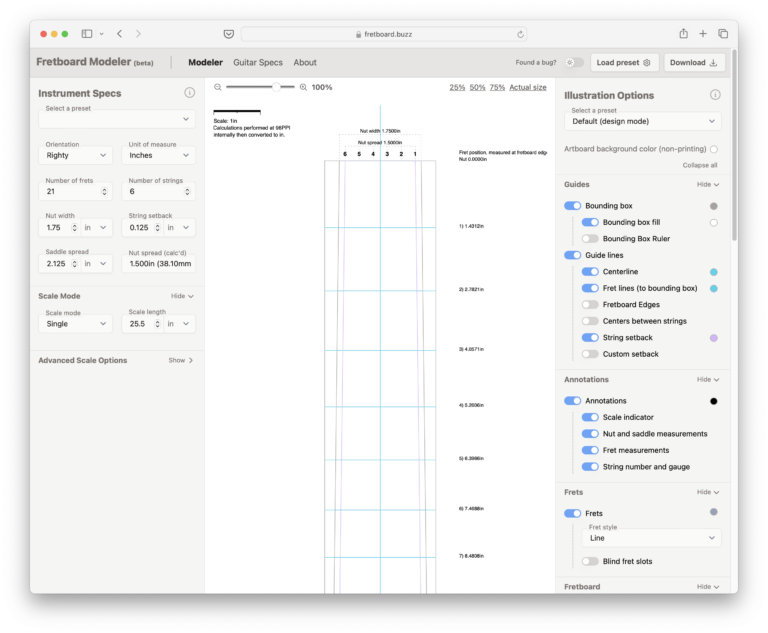
Say hello to fretboard.buzz
I just released fretboard.buzz, a free online tool that helps luthiers design fretboards for guitar, bass, mandolin, ukulele, and more.
PDFObject 2.3 released, new site
PDFObject 2.3.0 has been released and is available immediately on NPM and related CDNs. The new pdfobject.com features more thorough documentation and examples.
Hi, I’m Philip Hutchison, aka @pipwerks. Thanks for visiting!
pipwerks.com (est. 2006) is my labor of love, dedicated to e-learning and web development, with a focus on hand-built, do-it-yourself code using standards, modern best practices, and open-source libraries. I’ve spent the better part of two decades absorbing the intricacies of accessible web development, e-learning development, and learning management systems, and have tried to document some of my experiences along the way.
accessibility (13) ActionScript (25) ADL (7) Adobe Captivate (40) Adobe Captivate Hacks (32) Adobe Flash (31) Apple (8) Apple Mac (8) Apple Mac Mini Server (5) AppleScript (4) best practices (13) Blackboard v Desire2Learn (6) canvas (4) CaptivateController (5) changelog (11) CSS (14) development tools (14) devlearn (5) e-learning (98) featured (5) GitHub (6) How-to (85) HTML (11) HTML 5 (6) IMS (6) interface design (6) Internet Explorer (6) JavaScript (65) JavaScript UI Goodies (11) jQuery (5) learning management systems (25) LETSI (10) MooTools (10) opinion (46) PDFObject (6) Rant (10) SCORM (54) SCORM 2.0 (5) SCORM actionscript class (21) SCORM wrapper (29) standards (59) SWFObject (8) technology (10) web browsers (13) web design and development (41)